> ## Documentation Index
> Fetch the complete documentation index at: https://docs.unoverse.ai/llms.txt
> Use this file to discover all available pages before exploring further.
# How it fits together
A quick map before you start building. The **Architecture** section has the full detail.
## The runtime
At its core, unoverse is an MCP server. Every interface you build is served to clients as an
MCP app, and every MCP app is powered by a workflow and the nodes behind it. The
implementation is native MCP rather than an adapter, so any MCP client works: ChatGPT,
Claude, or your own apps through the SDKs.
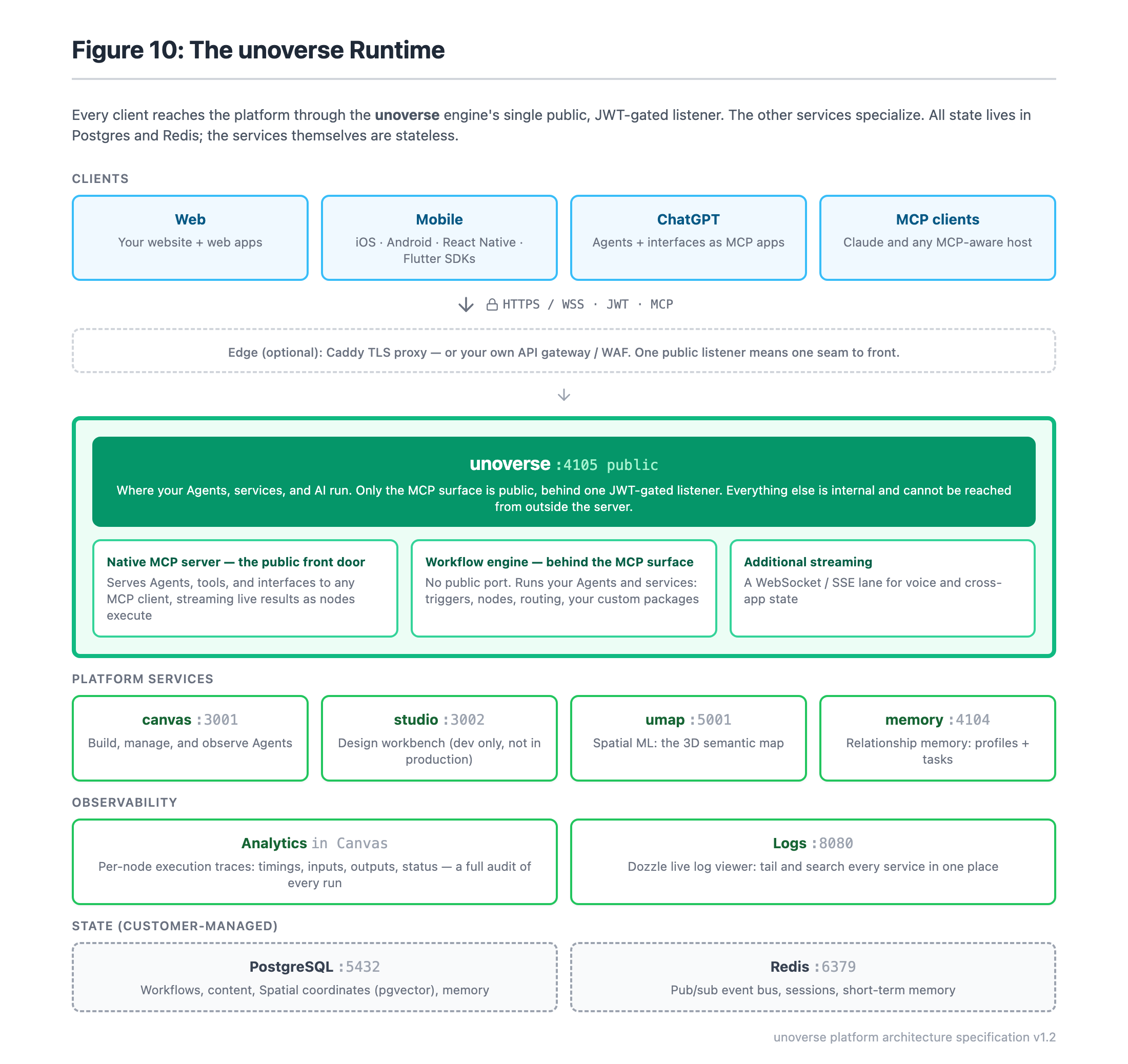 * **unoverse** is the engine. Your Agents run here, your workflows execute here, and the MCP
surface is served from here. It is the only service the internet reaches, and every
request on it is authenticated.
* **Canvas** is where you build and observe Agents. It is an operator tool, not a public
page.
* **Studio** is where you design components, templates and skills. It runs on your own
machine and is never deployed.
* **Spatial ML** maintains the semantic map behind **Spatial**.
* **Memory** keeps user profiles and open tasks, so an Agent can reason about the same
person across weeks.
All state lives in Postgres and Redis.
## Your code and the platform stay separate
The platform runs on the VM as Docker images, pulled from the registry by tag. Everything
you author lives in your universe's database and arrives by publishing.
* **unoverse** is the engine. Your Agents run here, your workflows execute here, and the MCP
surface is served from here. It is the only service the internet reaches, and every
request on it is authenticated.
* **Canvas** is where you build and observe Agents. It is an operator tool, not a public
page.
* **Studio** is where you design components, templates and skills. It runs on your own
machine and is never deployed.
* **Spatial ML** maintains the semantic map behind **Spatial**.
* **Memory** keeps user profiles and open tasks, so an Agent can reason about the same
person across weeks.
All state lives in Postgres and Redis.
## Your code and the platform stay separate
The platform runs on the VM as Docker images, pulled from the registry by tag. Everything
you author lives in your universe's database and arrives by publishing.
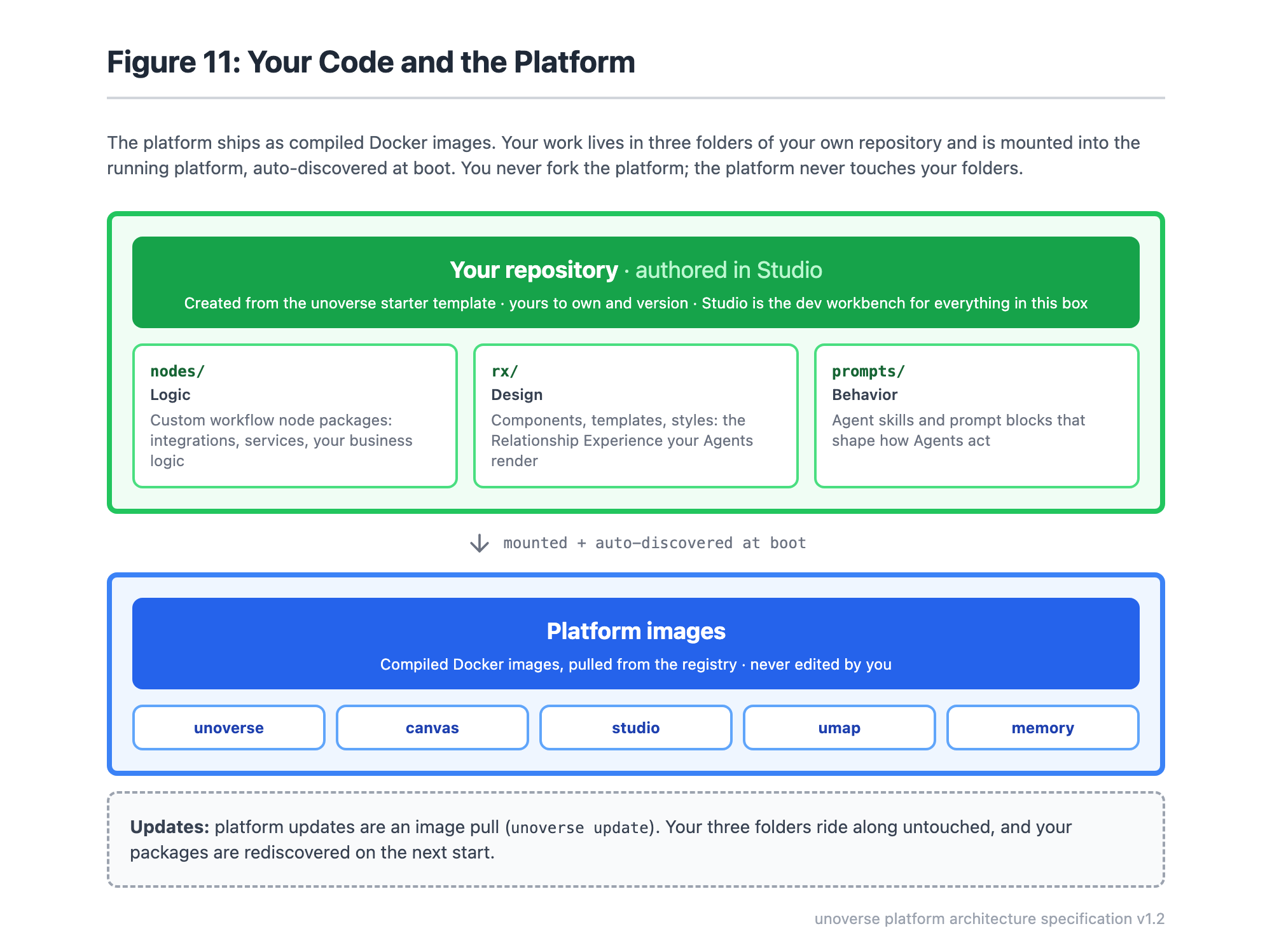 You never fork the platform, and the platform never writes to your folders. Upgrading is an
image pull, and it cannot disturb your content.
## The same system at every size
There are three sizes, and they scale the machine and the data stores rather than the shape
of the system. A demo universe and a production one run the same images in the same
arrangement.
Infrastructure is Terraform that ships with the starter kit. It runs in your own cloud
account and hands the deploy a complete environment file.
## Read on
| | |
| ----------------------------------------------------------- | ----------------------------------------------------- |
| [Architecture](../architecture/overview.md) | What runs, and what it talks to |
| [Deployment Options](../architecture/deployment-options.md) | The three sizes, and what is deliberately not offered |
| [Provisioning](../architecture/terraform.md) | Five inputs, one command |
| [Security Posture](../architecture/security.md) | Written for the review |
| [Runbooks](../runbooks/overview.md) | Deploying and operating a universe |
You never fork the platform, and the platform never writes to your folders. Upgrading is an
image pull, and it cannot disturb your content.
## The same system at every size
There are three sizes, and they scale the machine and the data stores rather than the shape
of the system. A demo universe and a production one run the same images in the same
arrangement.
Infrastructure is Terraform that ships with the starter kit. It runs in your own cloud
account and hands the deploy a complete environment file.
## Read on
| | |
| ----------------------------------------------------------- | ----------------------------------------------------- |
| [Architecture](../architecture/overview.md) | What runs, and what it talks to |
| [Deployment Options](../architecture/deployment-options.md) | The three sizes, and what is deliberately not offered |
| [Provisioning](../architecture/terraform.md) | Five inputs, one command |
| [Security Posture](../architecture/security.md) | Written for the review |
| [Runbooks](../runbooks/overview.md) | Deploying and operating a universe |