> ## Documentation Index
> Fetch the complete documentation index at: https://docs.unoverse.ai/llms.txt
> Use this file to discover all available pages before exploring further.
# Install Marketplace Nodes
Your platform starts empty; the marketplace stocks it. Ready-made node packages, from OpenAI to Airtable and AWS, install with one click. Start here and download what your Agents will need.
## Before you begin
The platform is running (`unoverse start`), and **Studio** is open (`unoverse studio`).
## Install a package
In **Studio**, open **Nodes**. The **Marketplace** rail on the left lists every available package, how many nodes each one contains, and what you have installed.
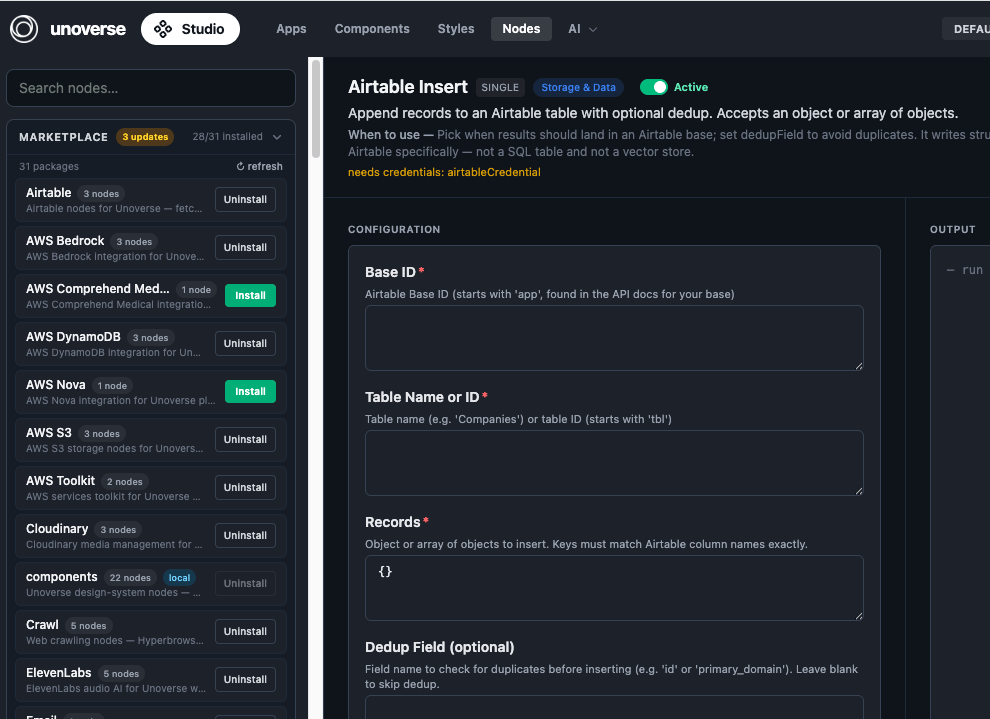 Click **Install** on a package. Its nodes register with the platform and appear in the node library in **Canvas**, ready to drag into a workflow. **Uninstall** removes them the same way.
Install **OpenAI** now; the next challenge uses it to build your first Agent.
Some nodes talk to external services and name the credential they need. Add it in **Canvas** under **Credentials**. The next challenge walks through this for your OpenAI key.
The marketplace badges packages with available updates. Click **Refresh** to check, then update a package in place.
Installed packages are part of your platform state, so they deploy themselves. Production reads the same state and installs the same packages automatically; there is nothing extra to ship.
## Next steps
Wire a trigger, a model, and a response together in Canvas, and talk to it.
Need something the marketplace doesn't have? Build it.
Click **Install** on a package. Its nodes register with the platform and appear in the node library in **Canvas**, ready to drag into a workflow. **Uninstall** removes them the same way.
Install **OpenAI** now; the next challenge uses it to build your first Agent.
Some nodes talk to external services and name the credential they need. Add it in **Canvas** under **Credentials**. The next challenge walks through this for your OpenAI key.
The marketplace badges packages with available updates. Click **Refresh** to check, then update a package in place.
Installed packages are part of your platform state, so they deploy themselves. Production reads the same state and installs the same packages automatically; there is nothing extra to ship.
## Next steps
Wire a trigger, a model, and a response together in Canvas, and talk to it.
Need something the marketplace doesn't have? Build it.