

/embed.js. One script tag puts your Agent on
any website: it draws a launcher, and clicking it opens a drawer with your app inside.
src, takes the app from data-app, and asks your universe for everything else at
runtime.
Before you begin
Your universe is running, and you have an app published from studio and bound to a workflow. Its id isorg/name.
Build it
1
Start the client starter
The starter is a small fake website with the tag already in place. It is on GitHub at
unoverse-platform/client, and the CLI
scaffolds it for you.Choose Client.
Terminal
create scaffolds into the folder you are standing in, so make one
first. Passing a name makes a subfolder instead: unoverse create my-site.Then it hands you three commands:.env needs two values, and the rest only matter if your app has a login:The page it serves stands in for the website you already have, so you see the assistant in
place rather than on a blank page.
2
Point it at your app
VITE_UNOVERSE_APP is the id from studio, in the form org/app.Open the page and click the launcher. Your app opens in the drawer.3
Choose who can use it
The audience is decided on the canvas, not on the page. Open your workflow’s
Input Trigger and turn on Public Entry.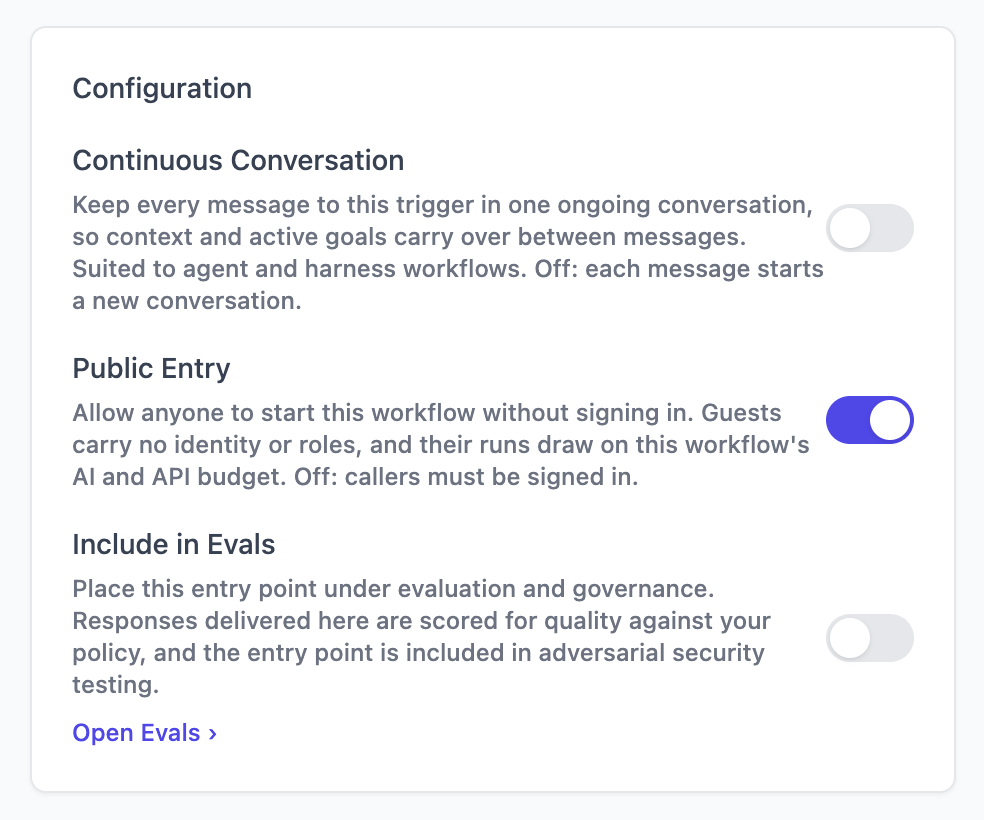
Two things follow from turning it on. Guests carry no identity and no roles, so anything your
workflow gates on a role is closed to them. And their runs draw on this workflow’s AI and API
budget, so a public entry point is a spending decision as much as an access one.Each trigger decides its own audience, so a public trigger on the same workflow opens nothing
for a signed-in one.
4
Hand it your login
Skip this step if your app is public.The embed never signs anyone in. Your website already has a login, and the embed forwards its
token. Publish a getter before the embed tag:The tag is
async, so a script after it may run second. Declaring the getter first is what
makes it reliable.data-login-url names your sign-in page. {url} becomes the page the visitor was on,
encoded, so your login can return them to it. Without it the drawer says “Please sign in to
continue” and stops there.src/host.js in the starter is a working OIDC example. Replace the body of token() with
however your site gets its token, or delete the file if your app is public.Your universe verifies tokens against the issuer and audience it was deployed with, so they
have to match the ones your site signs in with.5
Put it on your own site
Delete the starter’s page and keep two tags:The second tag is the assistant. The first is your login, and it goes if your app is public.
What happens, and when
On page load the script is downloaded, reads its own tag, and draws a launcher. No request reaches your universe. A visitor who never clicks costs you nothing. On the first click it asks your universe whether the app needs a login, takes a token from your page or mints a guest identity, reads the app over MCP, and puts it in an iframe. After that it only relays: the app says how wide it wants to be, and the drawer obeys. If that first question cannot be answered, the embed assumes the app is secured and asks for a sign-in. It fails closed, never open.Reference
Script tag attributes
Onlydata-app is required.
The drawer’s width is not an attribute. The app decides how wide it is, so the same app is
the right size on every site that embeds it.
Your own buttons
window.unoverse exists once the script has run.
With
data-chrome="none" these are the only way in. Your site keeps its own buttons, and the
assistant opens from any of them.
Analytics
The embed reports events to the analytics tag your page already has, and it runs in your page’s own realm. The visitor’s client id, their consent state and your retention terms are the ones your site already resolved, so the events file under the same visitor as the rest of your site. A server-side call would inherit none of that.
You choose which moments are reported by adding a key to a node, so nothing is measured
unless you say so. Analytics covers what to mark and what arrives.
What the embed stores
One value inlocalStorage, and it is not a cookie.
The conversation is never stored. It lives exactly as long as the page that opened it, so a
reload starts a fresh one. The Agent still recognises the visitor through the guest id and
user memory.
Next steps
Deployment
Take your universe to a production server.
The Design journey
Components, state, apps and tokens, in full depth.