Two ways to use unoverse
The platform is the same either way, and so is authoring. You build in studio and publish over the API. What changes is who runs the universe.
Connecting is the faster start. You point studio at a universe that is already
deployed. That might be a hosted unoverse you have an account on, or your own company’s
deployment you have permissions for. Your components, apps, skills and nodes live in your
org’s Git repo, the universe pulls them into its database, and authoring never requires a
deployment of your own.
Running your own puts the same platform in your account. It suits a full enterprise
deployment in a private cloud. It is the only option when data cannot leave your network.
You pull the platform images from the registry, and Docker Compose runs them.
The registry token comes with your licence. It is read-only, and it lets your
machines pull the platform images. Terraform takes it as
docr_token, and unoverse deploy
asks for it on the first run of a new ground.Where you can run it
One VM with Docker Compose is the deployment, at every size. An operations team can read the whole arrangement in an afternoon.Amazon Web Services
 Ready now. Terraform creates the machine, the database, the cache, the entry point, and Cognito for sign-in
DigitalOcean
 Ready now. The same, and Postgres has three modes: a new cluster, one you already own, or any URL
Azure
 Coming soon. The images run there today on a VM you make yourself. There is no Terraform module yet
Google Cloud
 Coming soon. The same position as Azure. The images run on a VM you make yourself
Today the platform runs as Docker containers on one machine, and both of the above wait on
the multiple-instance work. Deployment Options states
what is ready and what is not.
Authentication
Authentication is a deployment input, and the platform will not run in production without it. The universe verifies a JWT on every request, so identity is settled before a workflow sees anything. Roles and permissions are separate levels, and Security covers how the two map. You bring the provider, with one exception.
AWS is the one ground that creates a provider for you. Everywhere else the issuer is a
variable, so swapping WorkOS for Entra is configuration rather than a code change.
Auth can be turned off for local testing, and only for local testing.
AUTH_ENABLED=false
injects a fixed development identity with no roles and no permissions. The service refuses
to start if that flag is set while NODE_ENV=production, so a test setting cannot reach a
deployment by accident.The runtime
At its core, unoverse is an MCP server. Every interface you build is served to clients as an MCP app, and every MCP app is powered by a workflow and the nodes behind it. The implementation is native MCP rather than an adapter. So there are two ways to reach a universe. An MCP client connects natively, with nothing to build, and ChatGPT, Claude and Claude Code all work today. Everything else uses an SDK, which renders the same definitions as native UI. The web SDK ships now, and React Native, Flutter, iOS and Android follow as those SDKs land.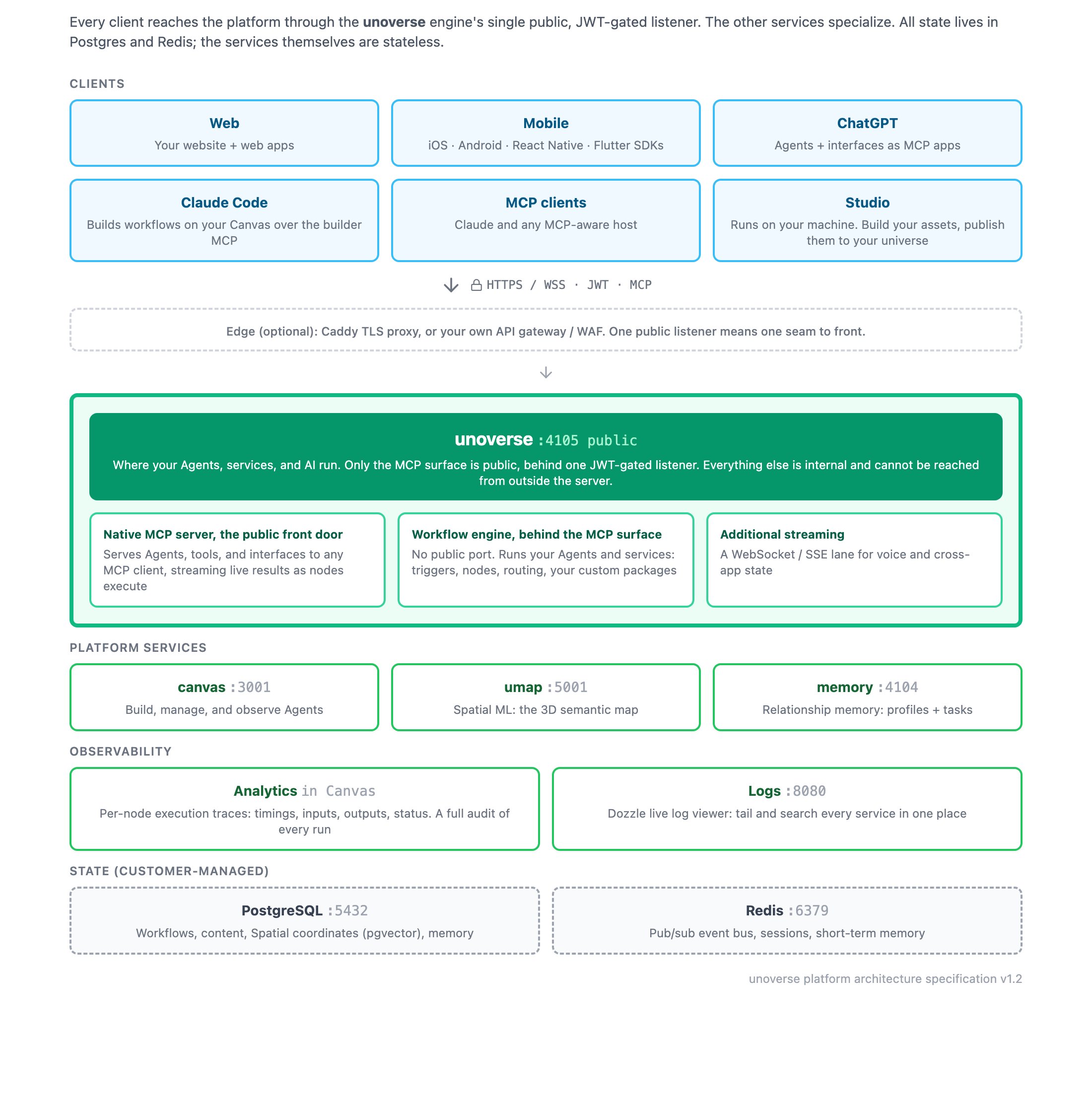
- unoverse is the engine. Your Agents run here, your workflows execute here, and the MCP surface is served from here. It is the only service the internet reaches, and every request on it is authenticated.
- canvas is where you build and observe Agents. It is an operator tool, not a public page.
- Spatial ML maintains the semantic map behind spatial.
- Memory keeps user profiles and open tasks, so an Agent can reason about the same person across weeks.
The MCP surface signs clients in the way the spec now defines. A call with no token gets
a 401 and a
WWW-Authenticate header naming the universe’s protected resource metadata
(RFC 9728). The client reads that, finds the authorization server, and runs an OAuth flow
with PKCE. Nothing about your provider is configured in the client, because the client
discovers all of it from the universe.Your code and the platform stay separate
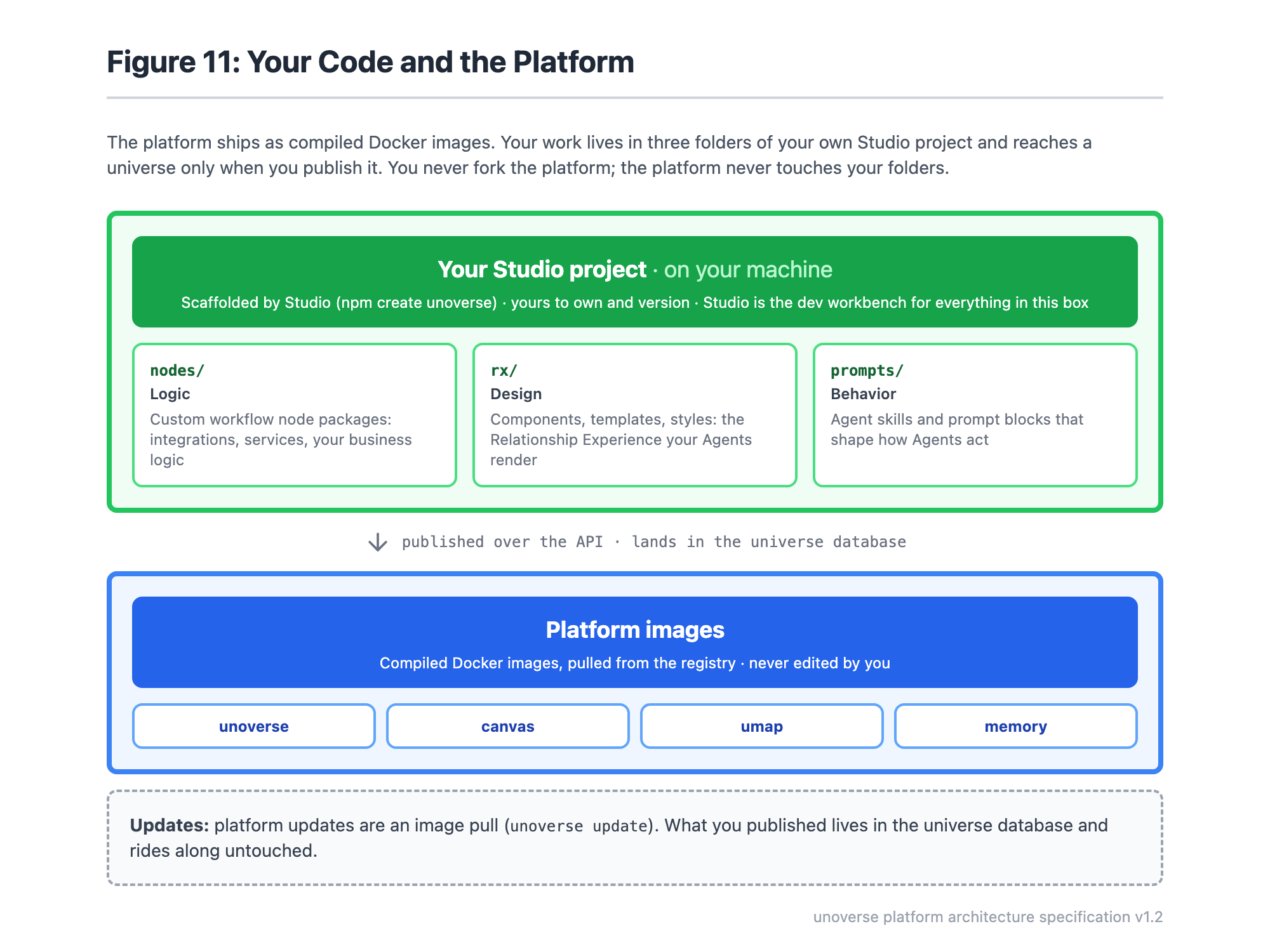
The platform runs on the VM as Docker images, pulled from the registry by tag. Everything you author lives in your org’s own Git repo, and every universe pulls that repo into its database (Environments). You author in Studio: components, apps, skills and nodes. It is not one of the platform services. It is a developer tool you install from npm, and it runs on your own machine against your org repo. Nothing of studio is deployed with the platform.